
excel2007取消加密保護的教程
在Excel中有很多重要的數據前期需要加上密碼保護,但到后期卻已經不再重要需要取消加密保護,下面是學習啦小編帶來的關于excel 2007取消加密保護的教程的內容,歡迎閱讀!
excel 2007取消加密保護的教程
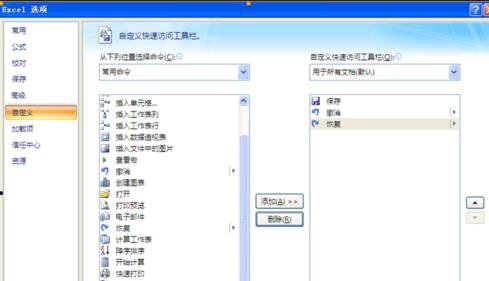
1、打開Excel表格中的Excel選項,選擇自定義,得到如下畫面:
excel2007撤銷保護密碼的方法圖1
2、然后在左邊側框欄中選擇“查看宏”
之后雙擊或者選擇添加按鈕,則可以看到右邊欄中有了查看宏按鈕,之后點擊右下角的確定。
3、大家可以在下面這個窗口處看到箭頭所指的按鈕:
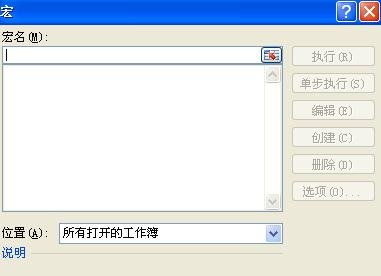
點擊按鈕,之后彈出窗口:

excel2007撤銷保護密碼的方法圖2
excel2007撤銷保護密碼的方法圖3
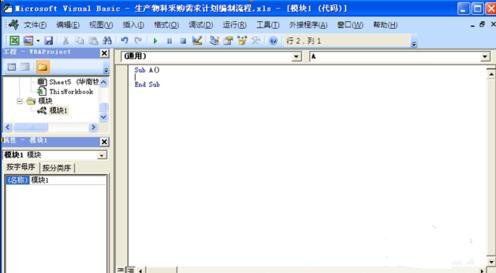
4、在宏名處填寫一個名字(可隨意),然后點擊創建,彈出以下窗口:
excel2007撤銷保護密碼的方法圖4
5、將窗口內的內容全選后刪除,然后將下面分割線以內的內容開始復制粘貼在上面的窗口內:
從橫線下開始復制
------------------------------------------------------------------------------------------
Option?Explicit
Public?Sub?AllInternalPasswords()
\'?Breaks?worksheet?and?workbook?structure?passwords.?Bob?McCormick
\'?probably?originator?of?base?code?algorithm?modified?for?coverage
\'?of?workbook?structure?/?windows?passwords?and?for?multiple?passwords
\'
\'?Norman?Harker?and?JE?McGimpsey?27-Dec-2002?(Version?1.1)
\'?Modified?2003-Apr-04?by?JEM:?All?msgs?to?constants,?and
\'?eliminate?one?Exit?Sub?(Version?1.1.1)
\'?Reveals?hashed?passwords?NOT?original?passwords
Const?DBLSPACE?As?String?=?vbNewLine?&?vbNewLine
Const?AUTHORS?As?String?=?DBLSPACE?&?vbNewLine?&?_
"Adapted?from?Bob?McCormick?base?code?by"?&?_
"Norman?Harker?and?JE?McGimpsey"
Const?HEADER?As?String?=?"AllInternalPasswords?User?Message"
Const?VERSION?As?String?=?DBLSPACE?&?"Version?1.1.1?2003-Apr-04"
Const?REPBACK?As?String?=?DBLSPACE?&?"Please?report?failure?"?&?_
"to?the?microsoft.public.excel.programming?newsgroup."
Const?ALLCLEAR?As?String?=?DBLSPACE?&?"The?workbook?should?"?&?_
"now?be?free?of?all?password?protection,?so?make?sure?you:"?&?_
DBLSPACE?&?"SAVE?IT?NOW!"?&?DBLSPACE?&?"and?also"?&?_
DBLSPACE?&?"BACKUP!,?BACKUP!!,?BACKUP!!!"?&?_
DBLSPACE?&?"Also,?remember?that?the?password?was?"?&?_
"put?there?for?a?reason.?Don\'t?stuff?up?crucial?formulas?"?&?_
"or?data."?&?DBLSPACE?&?"Access?and?use?of?some?data?"?&?_
"may?be?an?offense.?If?in?doubt,?don\'t."
Const?MSGNOPWORDS1?As?String?=?"There?were?no?passwords?on?"?&?_
"sheets,?or?workbook?structure?or?windows."?&?AUTHORS?&?VERSION
Const?MSGNOPWORDS2?As?String?=?"There?was?no?protection?to?"?&?_
"workbook?structure?or?windows."?&?DBLSPACE?&?_
"Proceeding?to?unprotect?sheets."?&?AUTHORS?&?VERSION
Const?MSGTAKETIME?As?String?=?"After?pressing?OK?button?this?"?&?_
"will?take?some?time."?&?DBLSPACE?&?"Amount?of?time?"?&?_
"depends?on?how?many?different?passwords,?the?"?&?_
"passwords,?and?your?computer\'s?specification."?&?DBLSPACE?&?_
"Just?be?patient!?Make?me?a?coffee!"?&?AUTHORS?&?VERSION
Const?MSGPWORDFOUND1?As?String?=?"You?had?a?Worksheet?"?&?_
"Structure?or?Windows?Password?set."?&?DBLSPACE?&?_
"The?password?found?was:?"?&?DBLSPACE?&?"$$"?&?DBLSPACE?&?_
"Note?it?down?for?potential?future?use?in?other?workbooks?by?"?&?_
"the?same?person?who?set?this?password."?&?DBLSPACE?&?_
"Now?to?check?and?clear?other?passwords."?&?AUTHORS?&?VERSION
Const?MSGPWORDFOUND2?As?String?=?"You?had?a?Worksheet?"?&?_
"password?set."?&?DBLSPACE?&?"The?password?found?was:?"?&?_
DBLSPACE?&?"$$"?&?DBLSPACE?&?"Note?it?down?for?potential?"?&?_
"future?use?in?other?workbooks?by?same?person?who?"?&?_
"set?this?password."?&?DBLSPACE?&?"Now?to?check?and?clear?"?&?_
"other?passwords."?&?AUTHORS?&?VERSION
Const?MSGONLYONE?As?String?=?"Only?structure?/?windows?"?&?_
"protected?with?the?password?that?was?just?found."?&?_
ALLCLEAR?&?AUTHORS?&?VERSION?&?REPBACK
Dim?w1?As?Worksheet,?w2?As?Worksheet
Dim?i?As?Integer,?j?As?Integer,?k?As?Integer,?l?As?Integer
Dim?m?As?Integer,?n?As?Integer,?i1?As?Integer,?i2?As?Integer
Dim?i3?As?Integer,?i4?As?Integer,?i5?As?Integer,?i6?As?Integer
Dim?PWord1?As?String
Dim?ShTag?As?Boolean,?WinTag?As?Boolean
Application.ScreenUpdating?=?False
With?ActiveWorkbook
WinTag?=?.ProtectStructure?Or?.ProtectWindows
End?With
ShTag?=?False
For?Each?w1?In?Worksheets
ShTag?=?ShTag?Or?w1.ProtectContents
Next?w1
If?Not?ShTag?And?Not?WinTag?Then
MsgBox?MSGNOPWORDS1,?vbInformation,?HEADER
Exit?Sub
End?If
MsgBox?MSGTAKETIME,?vbInformation,?HEADER
If?Not?WinTag?Then
MsgBox?MSGNOPWORDS2,?vbInformation,?HEADER
Else
On?Error?Resume?Next
Do?\'dummy?do?loop
For?i?=?65?To?66:?For?j?=?65?To?66:?For?k?=?65?To?66
For?l?=?65?To?66:?For?m?=?65?To?66:?For?i1?=?65?To?66
For?i2?=?65?To?66:?For?i3?=?65?To?66:?For?i4?=?65?To?66
For?i5?=?65?To?66:?For?i6?=?65?To?66:?For?n?=?32?To?126
With?ActiveWorkbook
.Unprotect?Chr(i)?&?Chr(j)?&?Chr(k)?&?_
Chr(l)?&?Chr(m)?&?Chr(i1)?&?Chr(i2)?&?_
Chr(i3)?&?Chr(i4)?&?Chr(i5)?&?Chr(i6)?&?Chr(n)
If?.ProtectStructure?=?False?And?_
.ProtectWindows?=?False?Then
PWord1?=?Chr(i)?&?Chr(j)?&?Chr(k)?&?Chr(l)?&?_
Chr(m)?&?Chr(i1)?&?Chr(i2)?&?Chr(i3)?&?_
Chr(i4)?&?Chr(i5)?&?Chr(i6)?&?Chr(n)
MsgBox?Application.Substitute(MSGPWORDFOUND1,?_
"$$",?PWord1),?vbInformation,?HEADER
Exit?Do?\'Bypass?all?for...nexts
End?If
End?With
Next:?Next:?Next:?Next:?Next:?Next
Next:?Next:?Next:?Next:?Next:?Next
Loop?Until?True
On?Error?GoTo?0
End?If
If?WinTag?And?Not?ShTag?Then
MsgBox?MSGONLYONE,?vbInformation,?HEADER
Exit?Sub
End?If
On?Error?Resume?Next
For?Each?w1?In?Worksheets
\'Attempt?clearance?with?PWord1
w1.Unprotect?PWord1
Next?w1
On?Error?GoTo?0
ShTag?=?False
For?Each?w1?In?Worksheets
\'Checks?for?all?clear?ShTag?triggered?to?1?if?not.
ShTag?=?ShTag?Or?w1.ProtectContents
Next?w1
If?ShTag?Then
For?Each?w1?In?Worksheets
With?w1
If?.ProtectContents?Then
On?Error?Resume?Next
Do?\'Dummy?do?loop
For?i?=?65?To?66:?For?j?=?65?To?66:?For?k?=?65?To?66
For?l?=?65?To?66:?For?m?=?65?To?66:?For?i1?=?65?To?66
For?i2?=?65?To?66:?For?i3?=?65?To?66:?For?i4?=?65?To?66
For?i5?=?65?To?66:?For?i6?=?65?To?66:?For?n?=?32?To?126
.Unprotect?Chr(i)?&?Chr(j)?&?Chr(k)?&?_
Chr(l)?&?Chr(m)?&?Chr(i1)?&?Chr(i2)?&?Chr(i3)?&?_
Chr(i4)?&?Chr(i5)?&?Chr(i6)?&?Chr(n)
If?Not?.ProtectContents?Then
PWord1?=?Chr(i)?&?Chr(j)?&?Chr(k)?&?Chr(l)?&?_
Chr(m)?&?Chr(i1)?&?Chr(i2)?&?Chr(i3)?&?_
Chr(i4)?&?Chr(i5)?&?Chr(i6)?&?Chr(n)
MsgBox?Application.Substitute(MSGPWORDFOUND2,?_
"$$",?PWord1),?vbInformation,?HEADER
\'leverage?finding?Pword?by?trying?on?other?sheets
For?Each?w2?In?Worksheets
w2.Unprotect?PWord1
Next?w2
Exit?Do?\'Bypass?all?for...nexts
End?If
Next:?Next:?Next:?Next:?Next:?Next
Next:?Next:?Next:?Next:?Next:?Next
Loop?Until?True
On?Error?GoTo?0
End?If
End?With
Next?w1
End?If
MsgBox?ALLCLEAR?&?AUTHORS?&?VERSION?&?REPBACK,?vbInformation,?HEADER
End?Sub
-----------------------------------------------------------------------------------------
復制到橫線以上
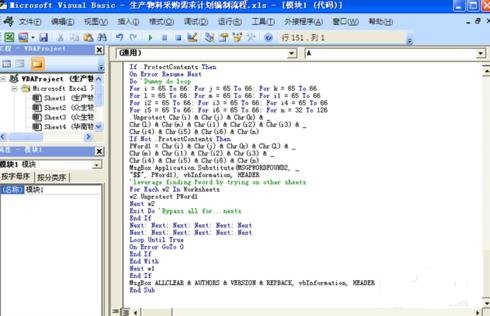
得到情況如下圖表示
excel2007撤銷保護密碼的方法圖5
6、關閉編輯窗口;
7、依次點擊菜單欄上的工具---宏-----宏,選AllInternalPasswords,運行,確定兩次;
等一會,就會出現以下對話框:這就是Excel密碼對應的原始密碼(此密碼和原先設置的密碼都能打開此文檔。如果是別人的文檔,你又想恢復密碼設置,就可以用此密碼進行保護,他就能用他設置的密碼打開,你可以試試,很有趣的。字母一定要大寫):
再點擊確定。Excel的原始密碼就被清除了!!
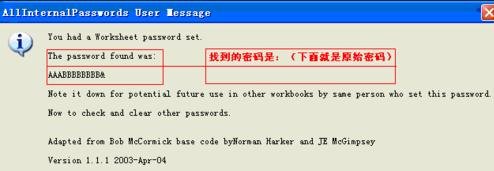
excel2007撤銷保護密碼的方法圖6
8、最后記得關閉EXCEL文檔時要保存,否則下回打開,文檔仍舊處于只讀狀態而無法修改。
excel2007取消加密保護的教程相關文章: